12. Cloud webapp — Dashboard
After login, Dashboard is your home for account health: how many machines you own, which are online, and what blended recently.
Who this track is for
Agronomists and site owners on
autoponixelemental.tech.
Field operators at the skid continue with chapters 2–9 (cabinet and HMI).
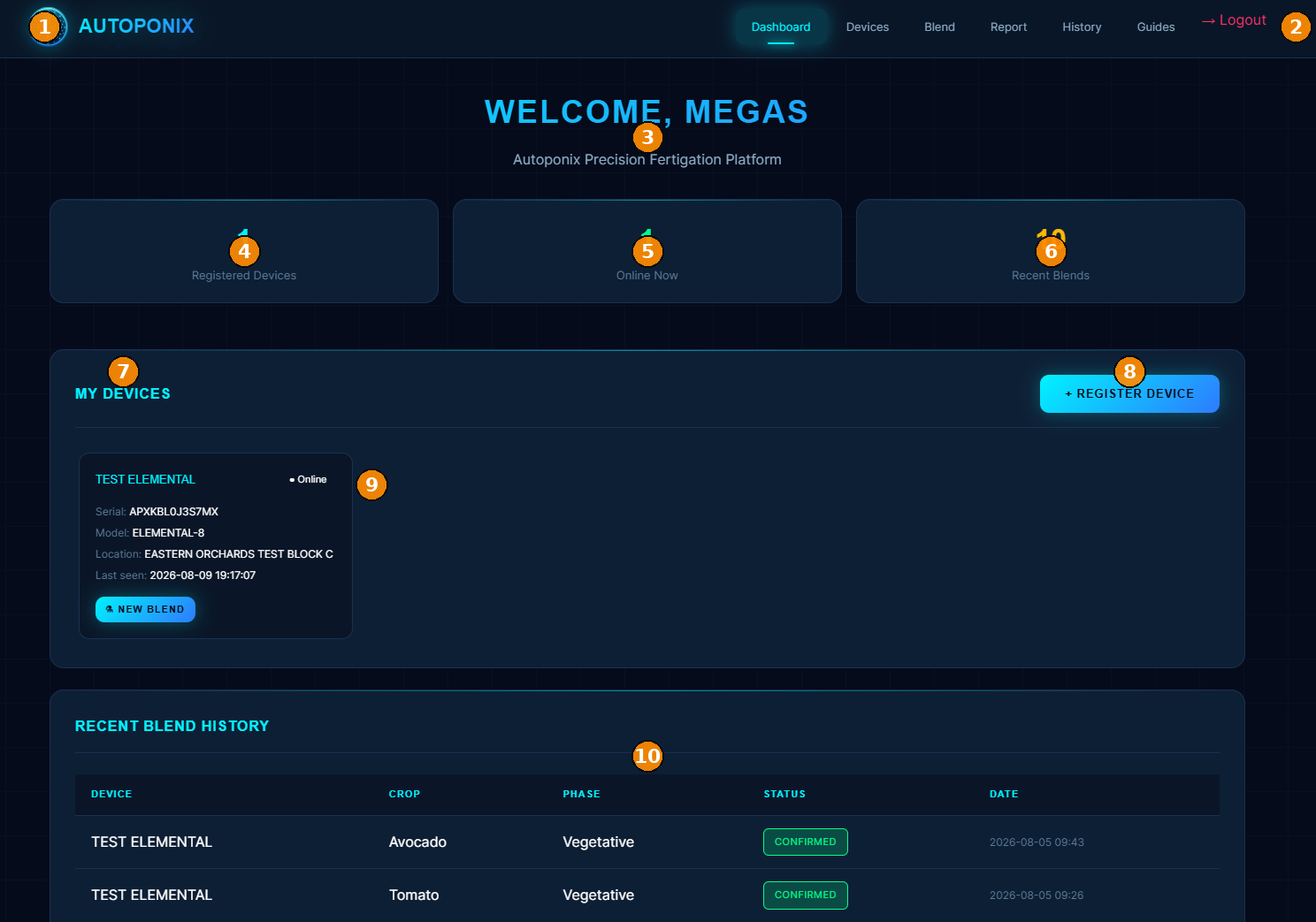
| # | Feature | What it means |
|---|---|---|
| 1 | Autoponix branding | Confirms you are on the cloud platform. |
| 2 | Logout | Ends your session securely. |
| 3 | Welcome header | Your account greeting and product title. |
| 4 | Registered Devices | How many panels are linked to this account. |
| 5 | Online Now | How many of those panels are currently connected. |
| 6 | Recent Blends | Count of recent blend activity. |
| 7 | My Devices | Section listing your registered machines. |
| 8 | + Register Device | Add a new panel by authorised serial number. |
| 9 | Device card | Name, Online/Offline, serial, model, location, last seen, and New Blend. |
| 10 | Recent Blend History | Short table of latest jobs (device, crop, phase, status, date). |
Top navigation
Dashboard · Devices · Blend · Report · History · Guides — use these tabs for the rest of this track.
Next
Devices
— manage and register units.