7. Home screen tour
Home is your control desk. Learn the layout once — every later chapter reuses these yellow numbers.
How to read the map
Match each yellow bubble on the screenshot to the table. Glance order before a blend:
#9 (badge) → #17 (alarms) → #20 (START).
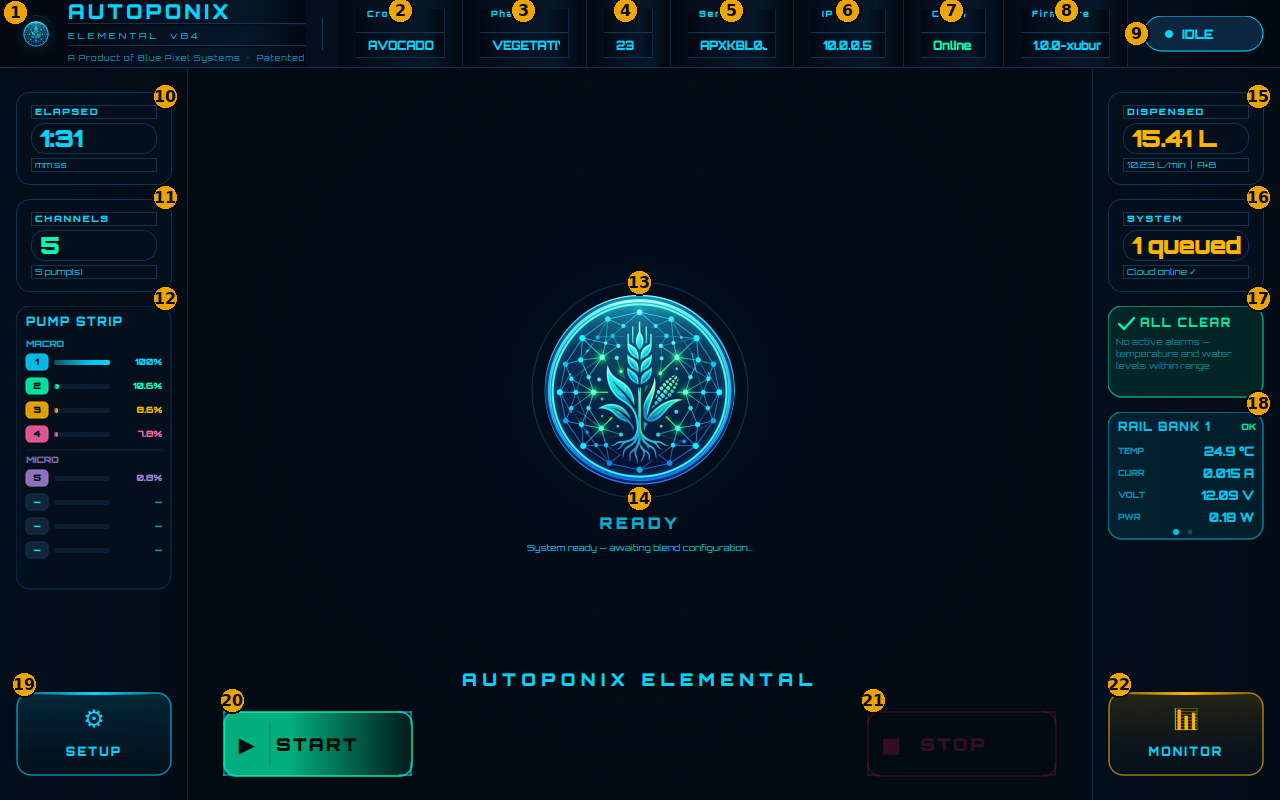
Top bar — job and identity
| # | Feature | What it means |
|---|---|---|
| 1 | Product branding | Autoponix Elemental name and version — confirms you are on the right panel. |
| 2 | Crop | Crop type for the current job (from the cloud), e.g. AVOCADO. |
| 3 | Phase | Growth phase for the job, e.g. VEGETATIVE. |
| 4 | Job | Job number from the cloud. Should show a real value before you start. |
| 5 | Serial | This panel’s serial number — quote it when you call for support. |
| 6 | IP | Network address of the panel. |
| 7 | Cloud | Online (green) = connected to Autoponix services. Offline = no cloud link right now. |
| 8 | Firmware | Software version running on this panel. |
| 9 | Status badge | Overall mode: IDLE, BLENDING, PAUSED, WARNING, or ERROR. Glance here first. |
Centre — live blend status
| # | Feature | What it means |
|---|---|---|
| 10 | ELAPSED | Time since the current blend started (minutes:seconds). |
| 11 | CHANNELS | How many pumps this job uses. |
| 12 | PUMP STRIP | Live MACRO and MICRO pump speeds (coloured bars and %). Higher % = that pump is working harder for this recipe. |
| 13 | Centre emblem | Main visual focus of the Home screen (animates while blending). |
| 14 | Centre status | Big status word (READY, PROCESSING, etc.) plus a short helper line underneath. |
| 15 | DISPENSED | Litres delivered so far and approximate flow rate (L/min). |
| 16 | SYSTEM | Short health summary (Ready / Active / Paused / Error) and notes such as cloud or queue. |
Right and bottom — alarms and actions
| # | Feature | What it means |
|---|---|---|
| 17 | Alarm card | ALL CLEAR when healthy, or a plain-language warning/alarm. Always read before START. |
| 18 | RAIL BANK | Temperature and power from the pump electronics. OK means that bank is reporting normally. |
| 19 | SETUP | Opens concentrate tanks and the system log. |
| 20 | START | Begins or resumes blending (bright green when allowed). |
| 21 | STOP | Stops blending and finishes the dispense report. |
| 22 | MONITOR | Opens output tanks A and B. |
| 23 | Bottom banner | Large on-screen message when present (e.g. PRIMARY POWER OFFLINE). Not always visible — see Warnings. |
Next
Put the map to work in
Running a blend.