6. Getting started
How to power up the Elemental machine safely from a cold start: mains, emergency cut-off, power switch, what you should see and hear, then the Home screen readiness checks.
Cabinet numbers used here
Refer to
Control cabinet
for the full map. This chapter focuses on
#5 Power switch,
#6 Emergency cut-off,
#2–#3 Indicator lights,
#7 Voltage gauge,
#8 Current gauge, and
#1 HMI.
DANGER — Live enclosure
Never open the Elemental control cabinet. Hazardous voltages are present behind the door
and can cause severe injury or death by electric shock. Operate only from the closed front
face: HMI, power switch, emergency cut-off, indicators, and gauges. Cabinet access is
reserved for qualified electrical personnel under lock-out / tag-out.
CAUTION — Never reverse the pump hoses
Refit every pump hose only to its correct suction / discharge port. Reversed hoses can
dose the wrong product, contaminate tanks, or damage equipment. See
Basic maintenance.
Step 0 — Plumbing and hose check (before power)
- Walk the skid and confirm there are no leakages in the plumbing: tote outlets, pump hose fittings, manifold joints, and output tank connections must be dry.
- Confirm pump hoses are on the correct ports (not reversed) and clamps are tight.
- If you find a leak or a suspect hose: do not turn power ON for a blend — contain the spill if needed and call maintenance.
Step 1 — Confirm mains power is connected
- Confirm the site supply to the Elemental cabinet is available and safe to use (qualified person / site procedure).
- Confirm the mains power connection is properly seated:
- Rear face #33 Mains power
- Top #34 Mains power connector
- Confirm Ethernet (#35) and other site cables are connected if the panel must reach the cloud — networking is not required just to power the HMI, but Online status later needs a link.
- Stand in front of the cabinet door so you can see the HMI (#1), indicators (#2–4), power switch (#5), emergency cut-off (#6), and gauges (#7–#8).
Step 2 — Deactivate the emergency cut-off (#6)
The emergency cut-off (#6) is a safety stop. When it is activated (pushed in), the machine must not run. Before normal start-up you must deactivate it.
- Look at emergency cut-off #6 on the front door.
- If it is pushed in (activated / tripped), twist the knob in the direction marked on the device (usually arrows) until it pops out / releases. That is the deactivated (ready) position.
- Confirm #6 is fully released and free — not stuck halfway.
If the emergency cut-off will not release
Do not force it with tools. Do not bypass it. Call a technician or your site administrator.
Never start with #6 still activated.
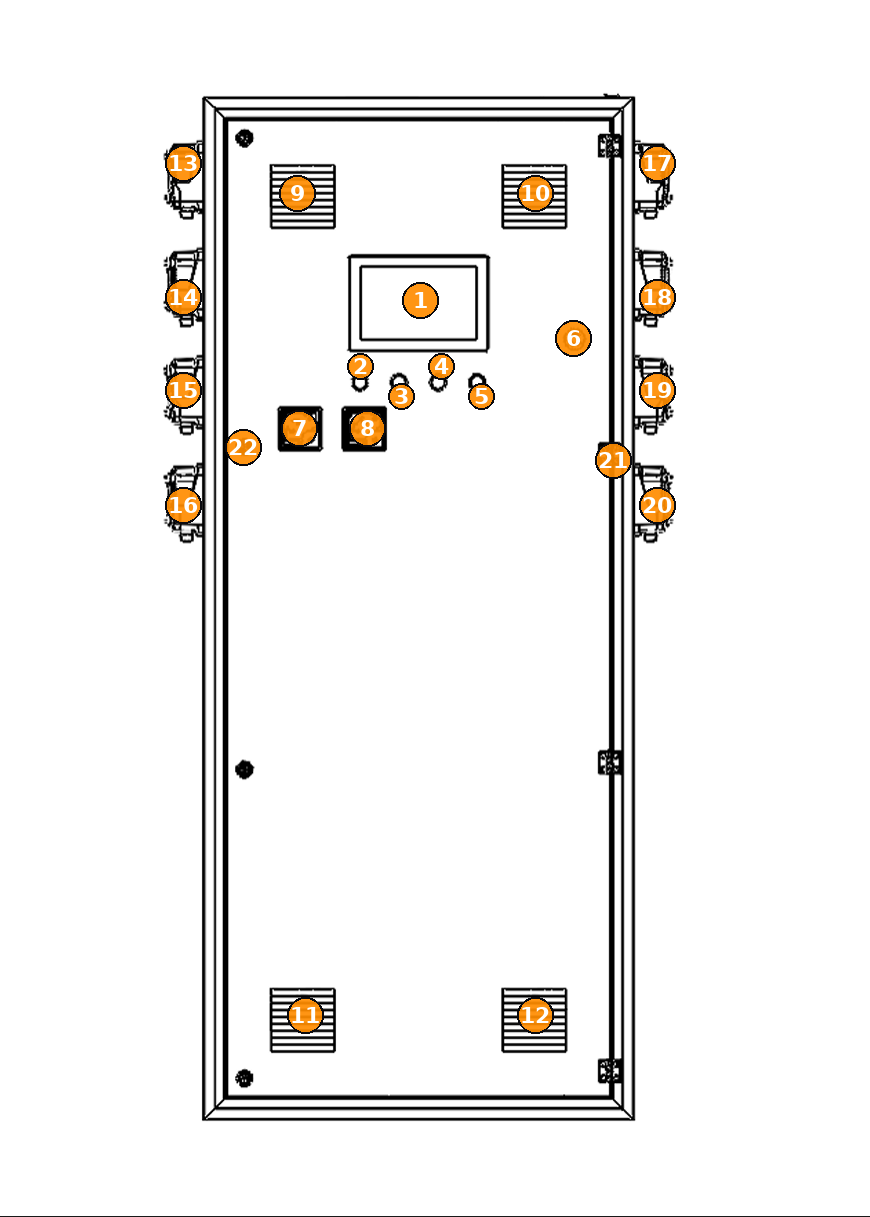
Step 3 — Turn the power switch (#5) ON
- Confirm emergency cut-off (#6) is deactivated (twisted / released).
- Turn the power switch (#5) firmly to the ON position (follow the ON marking on the switch).
- Keep your hand clear of the door edge and pump fittings while the system energises.
Step 4 — What you should see and hear immediately
Within a few seconds of turning #5 ON, confirm all of the following:
| # | What to check | Healthy response |
|---|---|---|
| 5 | Power switch / main power indication | Switch is in ON. The main power indicator associated with the power circuit illuminates (power is live). |
| 2 | Indicator light | Comes ON (status light active). |
| 3 | Indicator light | Comes ON (status light active). |
| 7 | Voltage gauge | Needle / display moves and settles near 240 V (typical single-phase site supply; small site variation is normal). |
| 8 | Current gauge | Moves away from zero as the cabinet draws start-up / idle current. It should not slam to full scale and stay pegged — that may indicate a fault. |
| — | Audible beeps | You should hear beeps from the panel / HMI as the electronics wake. |
| 1 | HMI display | The touchscreen comes on (backlight, boot splash or checklist). Wait for it to finish booting — do not press START yet. |
If power-up does not look right
- No lights / no HMI after #5 ON → confirm mains (#33 / #34), confirm #6 is released, then call a technician.
- Voltage gauge (#7) stays at 0 or far from ~240 V → turn #5 OFF, leave #6 ready to press if needed, call a technician.
- Current gauge (#8) pegs hard or breaker trips → turn #5 OFF immediately, call a technician.
- No beeps and blank HMI for more than about a minute → power OFF (#5) and escalate.
Step 5 — Wait for the Home screen
- Allow the HMI (#1) to complete its boot checklist.
- When Home appears, confirm:
- Centre of the screen shows large green text: READY
- Top-right status badge shows IDLE (not ERROR)
- Right-hand alarm card shows ALL CLEAR when possible
Normal at cold start — precharge (~10 seconds)
When the pump system first powers up, the main power rail waits about
10 seconds while capacitors charge safely (precharge).
During that short window the panel may show a “primary power offline” style message.
This is expected.
Do not press START yet. Wait roughly 10 seconds and confirm the message clears on its own. Continue only when Home shows READY / IDLE.
If “power offline” stays on for well over 10–15 seconds, or returns later during normal operation, treat it as a real fault — see Warnings & troubleshooting.
Do not press START yet. Wait roughly 10 seconds and confirm the message clears on its own. Continue only when Home shows READY / IDLE.
If “power offline” stays on for well over 10–15 seconds, or returns later during normal operation, treat it as a real fault — see Warnings & troubleshooting.
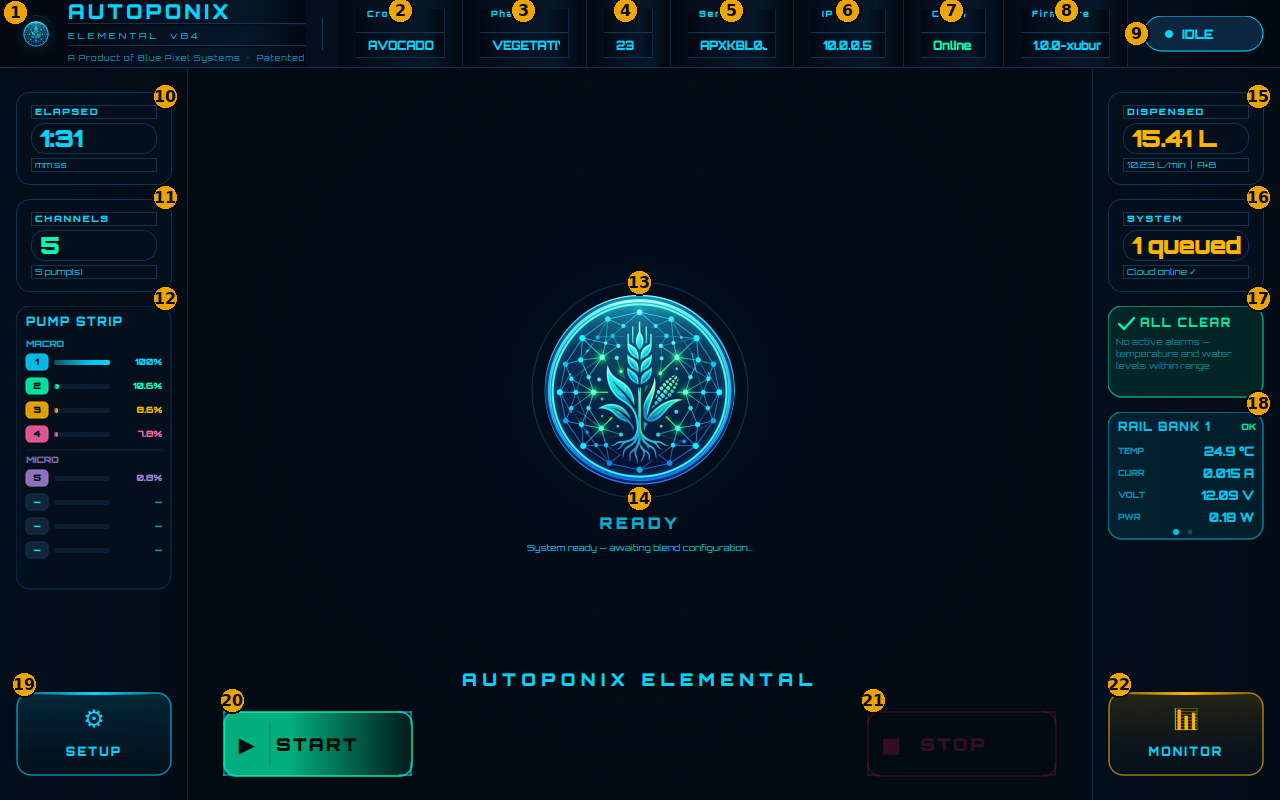
Step 6 — Pre-blend checklist (every run)
Only after the cabinet and Home screen are healthy. The next chapter maps each item to numbered Home controls.
- Crop, Phase, and Job appear in the top bar (a job has been received from the cloud).
- Cloud shows Online when possible.
- Status badge shows IDLE.
- Alarm card shows ALL CLEAR — or you understand any warning before you proceed.
- Concentrate tanks are not EMPTY or FAULT (check Setup if unsure).
- Output tanks are not FULL (check Monitor if unsure).
Shutting down (operator summary)
- Finish or STOP any active blend on the HMI.
- Turn power switch (#5) to OFF.
- Use emergency cut-off (#6) only for emergencies or when required by site lock-out — remember you must twist to deactivate it again before the next start.
Next
Learn every control on Home in
Home screen tour,
then run a blend.